Bring your document text.
Open the text you want to search in DiffFind.
 Open DiffFind
DIFFFIND FEATURES
Search within your document for an idea, even when the wording differs. DiffFind’s Semantic Search helps you locate relevant passages without knowing the exact words to look for.
Open the text you want to search in DiffFind.
Enter a query that expresses the concept you are looking for.
Read the matching passages in context to check their relevance.
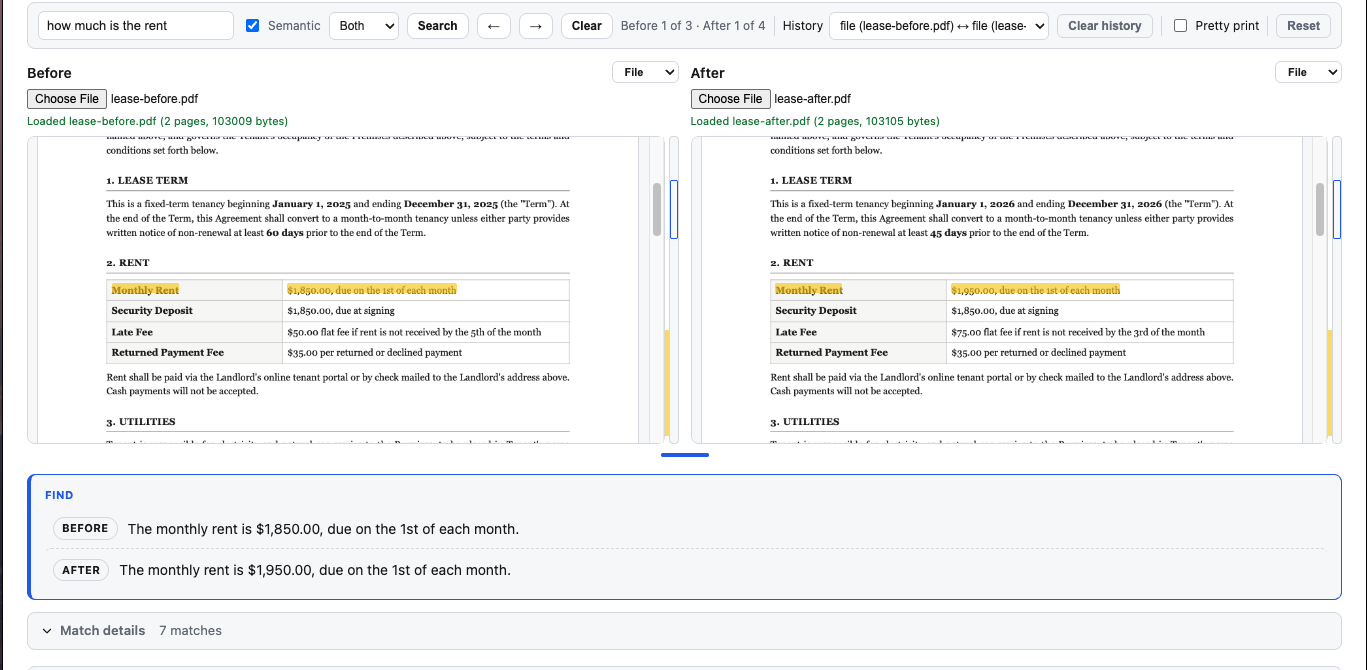
An illustrative semantic search example.
The application automatically attempts the operation again when the upstream service temporarily fails.
retry behavior
The application automatically attempts the operation again when the upstream service temporarily fails.
Find exact words or character sequences. Useful for known terms, identifiers, and values.
Find conceptually related content. Useful when you know the idea but not the document’s exact wording.
Semantic Search complements exact matching. Use it to locate a requirement, a description of behavior, or a policy provision, then read the original passage to confirm the details.
This feature searches within the document you provide. To examine changes between versions, use Text Compare or Semantic DiffSemantic Search.
TRY IT WITH YOUR OWN TEXT