Load your documents.
Open one document, or the original and the revised version, such as two PDFs.
 Open DiffFind
DIFFFIND FEATURES
Search a document for an idea instead of an exact phrase. Describe what you are looking for, such as “how much is the rent”, and DiffFind highlights the relevant passage even when the document words it differently.
Open one document, or the original and the revised version, such as two PDFs.
Type a question or concept instead of guessing the exact words.
Review the highlighted matches in each document and confirm the details in the original text.
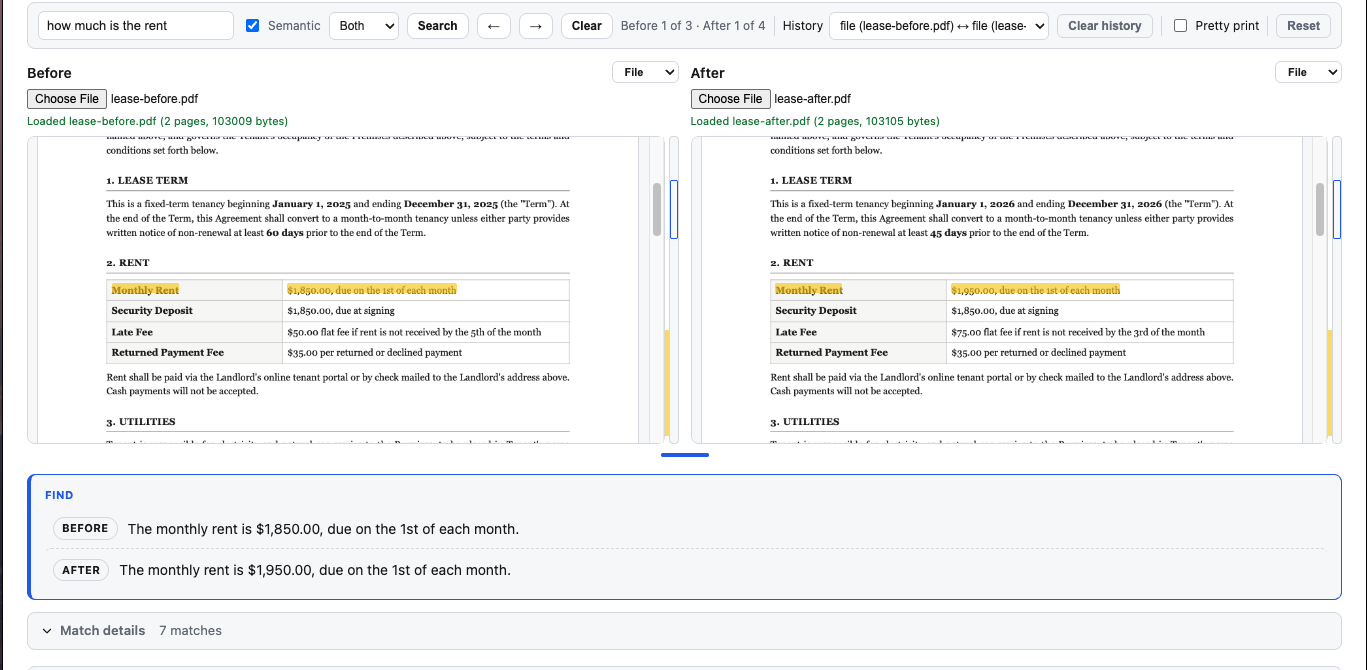
Use it to find a payment term, a termination clause, an obligation, or a described behavior when you know the idea but not the document’s wording. Searching both versions of a document lets you see how the answer to the same question changed.
Semantic search points you to relevant passages. Read the original text to confirm the details before relying on them.
For the search feature on its own, see Semantic Search. To see every difference between two versions, use Document Comparison or PDF Comparison.
TRY IT WITH YOUR OWN DOCUMENTS