Load both workbooks.
Choose the original and the revised XLS or XLSX file from your computer.
 Open DiffFind
DIFFFIND FEATURES
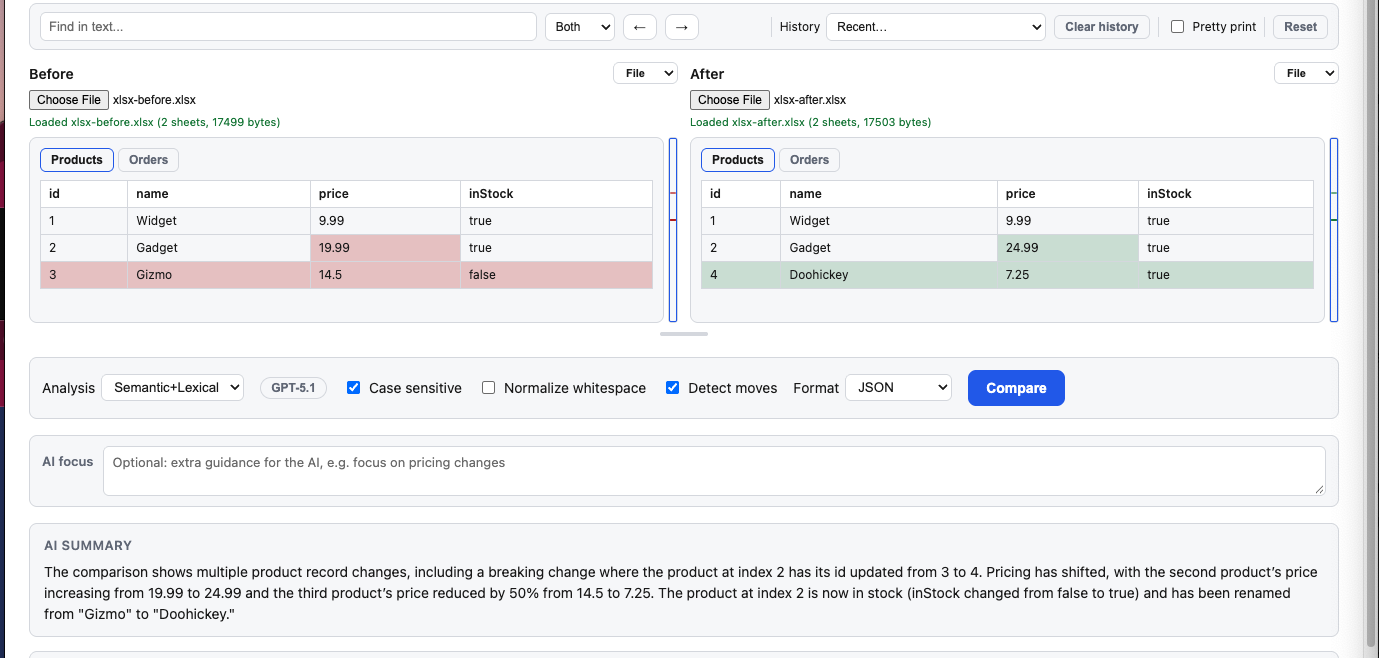
Load two versions of an Excel workbook and see exactly what changed. DiffFind compares every sheet of an XLS or XLSX file at once, so you can spot changed prices, quantities, and statuses without scrolling through cells.
Choose the original and the revised XLS or XLSX file from your computer.
Run the comparison across all sheets in the workbook at once.
See a Before and After view with the changed values highlighted.
Screenshot of the feature in the DiffFind app.
Use spreadsheet comparison to review product catalogs, budgets, price lists, inventory exports, and reports that get updated and passed around.
Instead of checking cells by eye, start from a highlighted view of what changed, across every sheet in the workbook.
Need to compare a document instead? Try PDF Comparison or Text Compare. To understand what a change means, see Semantic DiffSemantic Search.
TRY IT WITH YOUR OWN SPREADSHEETS