Load both PDFs.
Choose the original and the revised PDF from your computer.
 Open DiffFind
DIFFFIND FEATURES
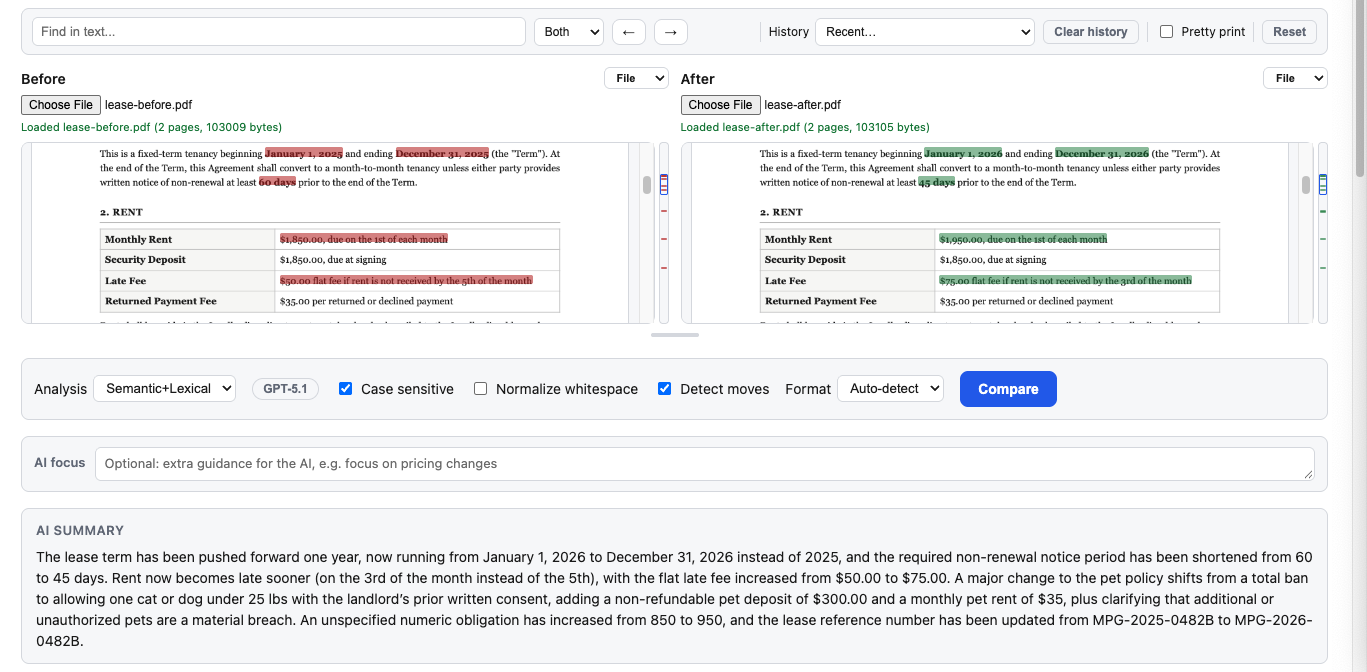
Load two versions of a PDF and see exactly what changed. DiffFind highlights the differences on the page, so you can review a revised contract, policy, or report without reading both documents line by line.
Choose the original and the revised PDF from your computer.
Run the comparison to find every difference between the two documents.
See changed, added, and removed text highlighted on the page.
Screenshot of the feature in the DiffFind app.
Use PDF comparison to review contract revisions, lease renewals, policy updates, invoices, reports, and any document where a small change can matter.
Instead of hunting for edits by eye, start from a highlighted list of what changed, then check each one against the page.
Need to compare plain text or spreadsheets instead? Try Text Compare or Excel Comparison. To understand what a wording change means, see Semantic DiffSemantic Search.
TRY IT WITH YOUR OWN PDFS